Big Brothers Big Sisters Miami · Back-To-School 2026

Raising your kid
in the age of AI

A parent's field guide, from a dad who is figuring it out at the same time you are.

Before we start

I am not here to scare you.

Most of us land on one of two responses. I have tried both. Neither one works.

Response one

Wait it out.

Read the headlines, hope it blows over, deal with it when they are older. It is not going to blow over, and by the time they are older the habits are already set.

Response two

Ban it.

Your child will use this anyway. At a friend's house, at school, at 14 when you are not in the room. A ban buys you quiet, not safety.

There is a third option. It is the rest of this talk.
Take an inventory tonight

Where AI already lives in your home

You do not have to download anything for your kid to be using AI today. Most of these came with something you already bought.

Smart speakers and displays

Alexa, Google Home, Siri. Your kid asks it questions and believes the answer.

The school device

Chromebooks and tablets come with AI writing and homework help built in.

Chat apps

AI assistants now sit inside messaging and social apps, one tap from a conversation.

The feed

What YouTube and TikTok show your kid is chosen by AI, and more of it is now made by AI.

We have a Google Home display in our kitchen. Noah plays riddles with it. He laughs when it gets one wrong. And he trusts it completely.

Why it feels overwhelming

Nothing has ever
arrived this fast

AI: 39% in two yearsShare of US adults 18 to 64, 2024
Internet: 22% in two yearsIt took seven to pass 60%
Home computer: 20% in three yearsReaching 70% took twenty two

It is not that AI is more powerful. It is that there was nothing to buy.

0 20% 40% 60% launch yr 2 yr 4 yr 6 yr 8 Home computer 70% took 22 years Internet Generative AI 50% by year 3
Bick, Blandin & Deming (NBER 32966 / Management Science 2025) · ITU/World Bank US internet series · US Federal Reserve FEDS Note, Apr 2026
Why now

Start now. Do not wait until they are teenagers.

This is already happening at 9, 10 and 11. Some of your kids are there now. The rest get there next year.

81%

already use or interact with AI

ages
9 to 12
58%

have already used an AI chatbot

ages
9 to 12
44%

have never had an adult talk to them about using it safely

all kids
9 to 17
Common Sense Media Census, published June 2026. 1,204 US kids aged 9 to 17, surveyed by SSRS.
An AI toy, account set to age 8
"I like to jump from my bunk! Where else can I jump from?"
"You could try a tree, a bench, your roof, or a window. Just remember, be safe."
Testers found 27% of AI toy responses were not appropriate for children. Common Sense Media now recommends no AI toys under 5, and extreme caution from 6 to 12.
The part nobody tells parents

They have to learn it.
So do we.

AI is here to stay. Your kid is going to have to learn it, the same way they learned to read a map or cross a street. That part is not in question.

You cannot spot what is going wrong inside a tool you have never opened.
A parent who has never talked to a chatbot cannot tell the difference between a kid using one for homework and a kid using one as a friend.
Every safety talk we have ever given our kids came after we understood the thing. Cars. Strangers. Social media. This is no different.

Your own literacy is the safety feature. There is no app that replaces it.

When it goes wrong

Do not take my word for it. Here is the research.

Two families are in court over teenagers who died after long conversations with a chatbot. Here is what the companies did next.

Character.AI

Removed open chat for under 18s. Entirely.

The whole platform now sits behind an age check.

blog.character.ai, Oct 2025
Meta

Paused teen access to AI characters

Worldwide. Every app they own.

about.fb.com, Jan 2026
OpenAI

Parental controls, then age detection

Quiet hours, and an alert to you if it detects distress.

openai.com, Sep 2025 and Jan 2026

Three companies looked at kids using their products and pulled them back. That is not my opinion about the risk. That is theirs.

The one rule that carries everything else

By hand first. Then enhance.

Attempt before augmenting. The order is what builds the brain that can judge the answer.

1

They try it

He writes it. He solves it. He draws it. Badly is the point.

2

Then the tool comes in

AI extends or critiques it. A collaborator, not a replacement.

3

They judge the answer

Was it right? How do you know? Only possible if step one happened.

In our house

Noah draws something. We photograph it and ask Claude to make its own version. Then we sit together and decide: did it get it right, or did it miss what he was going for?

What this looks like in a real house

Use it together, out loud, in the kitchen

Two things that happen in my home. Neither one required a subscription, a course, or a single setting change.

With the kid

Riddles with the Google Home

Noah asks it riddles. Sometimes it gets them wrong and he laughs. That laugh is the lesson: he is watching a machine be confidently incorrect, with his dad standing right there.

What he is learning: the machine is not an authority. It is a thing you check.
With the grown ups

My wife and the remodel

She photographs a room we want to redo and asks AI for advice. Layout, materials, what a contractor should charge. A real problem, in our house, with a real decision at the end.

What he is learning: this is a tool adults use to think, not a toy that does your homework.
Kids copy what they see you do far more than what you tell them to do.
Do this one tonight

The school calendar,
in your phone in 3 minutes

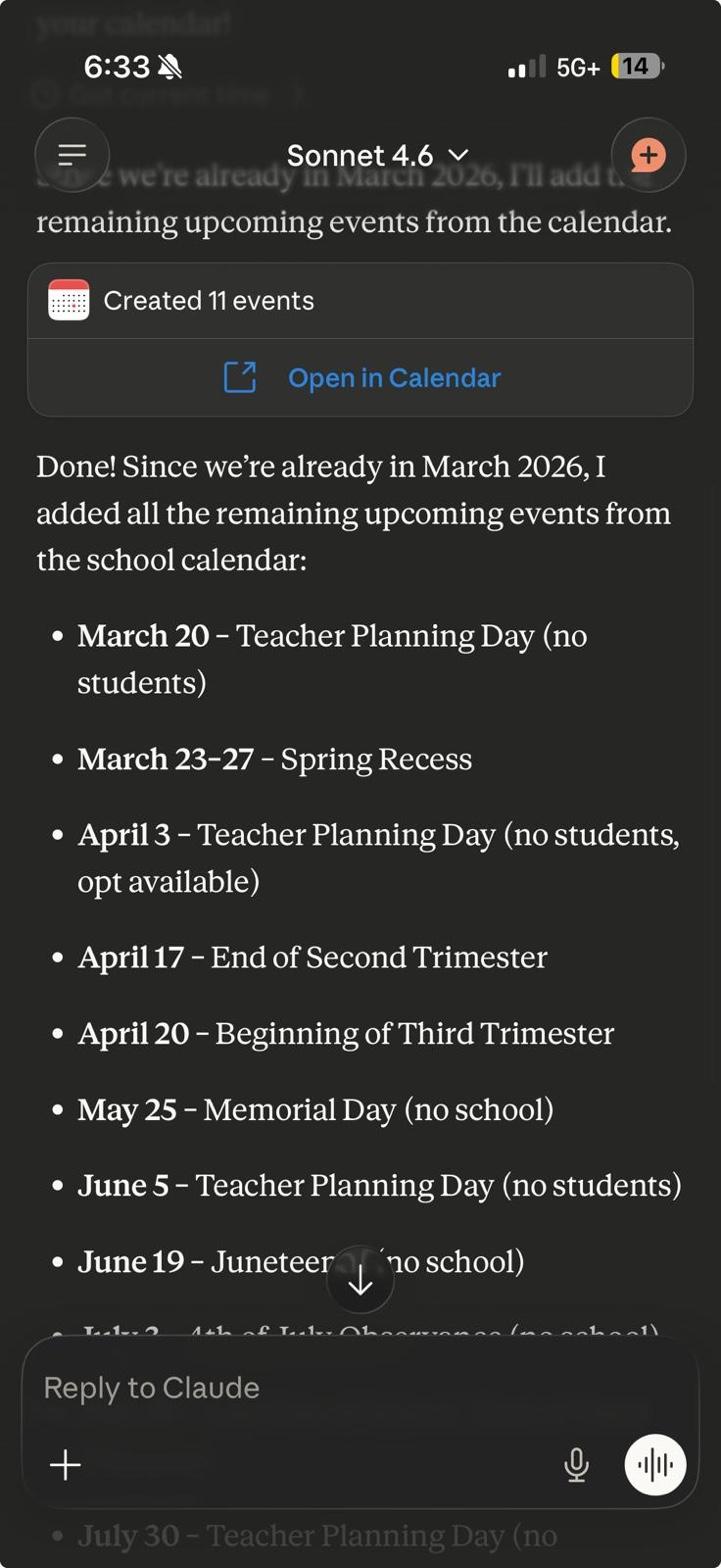
Every parent glances at the school calendar PDF, says they will add the dates later, then misses spring recess. Again.

1

Find your school's calendar PDF. Search "Miami-Dade 2026-2027 school calendar PDF" or grab it off your school's homepage.

2

Open the Claude app on your phone. Tap the plus, attach the PDF. Works on iPhone and Android.

3

Type one sentence. That is the whole prompt.

4

Approve what it shows you. It lists every event before it touches your calendar. You stay in control.

The exact prompt
"Update my calendar based on the school calendar attached"
11events added
<3 minstart to finish
0typed by hand
Freeplan works
The PDF
11 events created
And one for the group chat

400 unread in the
class parent group

You do not have time to scroll it. You also cannot afford to miss the one message about the field trip form. Let Claude read it for you.

1

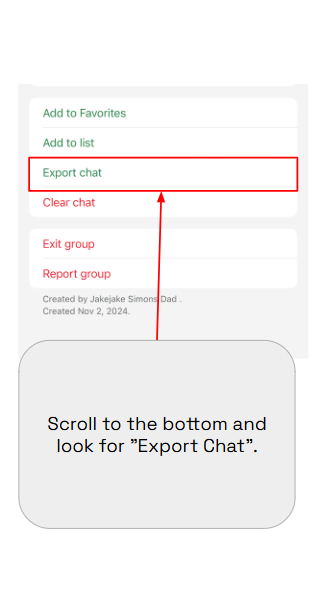
Tap the group name at the top. Scroll to the bottom, tap Export Chat, choose Without Media.

2

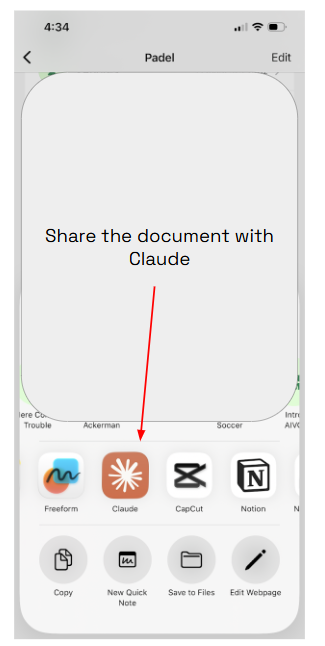
Share the file straight to Claude. WhatsApp gives you a ZIP. Claude reads it as is, no unzipping.

3

Ask for exactly what you need. Dates, deadlines, decisions, who volunteered for what.

4

Ask for it as a document. It will write you a summary, a checklist, even a dashboard you can share back to the group.

Try this prompt
"Read this chat. Give me every date, deadline and thing I need to do, and flag anything I already missed."
Export chat
Share to Claude
Start here

Four things you can do this week

Do not wait until the parental controls are perfect. I work in AI for a living and I still cannot get one clean dashboard across the iPhone, the Switch and the Google Home. The conversation is the control that actually works.

1

Use it yourself, on something real

The school calendar. The remodel. The trip. Out loud, where your kid can watch you check its work.

2

Ask your kid to show you

Not "are you using AI." Ask them to teach you what they use and how. Curiosity gets answers, interrogation does not.

3

Make "by hand first" the house rule

Try it yourself, then bring in the tool. One rule, every subject, easy to remember.

4

Pick one thing AI does not touch

Bedtime. The dinner table. The drive to school. One thing, said out loud, so the whole house knows it.

Take this home

sebastianpinzonduran.com
/parents

The checklist, the article, and a free study guide you can go through with your kid.

Sunday lunch at my grandparents' house in Colombia is a WhatsApp group now. Every generation raises its kids through some new technology. The tool changes. What we are trying to teach them does not.

I shared what I wrote about Noah in that group. My mom answered.

"La ciencia está al servicio del hombre y no lo contrario."

Science is at the service of people, not the other way around.

My mom In our family WhatsApp group, March 2026
Take a picture of this slide

Where this came from, and where to get help

Everything here is free. The ones marked ES have real Spanish versions.

Sebastian Pinzon Duran Dad to an 8 year old. I work with companies on AI. Ask me anything, now or later.
All of it in one place sebastianpinzonduran.com/parents
linkedin.com/in/sebasttianpinzon
Sebastian Pinzon Duran.
← → to navigate · F for fullscreen

Turn your phone sideways to read the slides

Tap to move through them. Everything that matters is also written out below.

Raising your kid in the age of AI

A parent's field guide, from a dad of an 8 year old who works in AI for a living. Given at the Big Brothers Big Sisters Miami Back-To-School event, August 2026.

Four things you can do this week

  1. Use it yourself, on something realThe school calendar. The remodel. The trip. Out loud, where your kid can watch you check its work.
  2. Ask your kid to show youNot "are you using AI." Ask them to teach you what they use and how. Curiosity gets answers, interrogation does not.
  3. Make "by hand first" the house ruleThey try it themselves, then the tool comes in, then you both judge the answer.
  4. Pick one thing AI does not touchBedtime. The dinner table. The drive to school. One thing, said out loud, so the whole house knows it.

Where to get help

All free. The ones marked ES have real Spanish versions.

Do this week
Family Media Plan ESBuilds a screen plan for your actual kids. Printable tonight. Family AI Literacy Toolkit ESShort videos and conversation cards to go through together. Gemini controls, Family Link ESTurn Gemini on or off for a child's account. Google's own steps.
If something goes wrong
Take It Down ESFree help removing a nude image of someone under 18, including fake ones. The photo never leaves your device. 988 Lifeline ESCall or text 988. Free, confidential, 24/7, in Spanish too. AI safety ratingsCheck a tool before you allow it. This is where the AI toy finding came from.
Go deeper
Nate B. Jones on cognitive offloadingThe idea behind "by hand first." Raising My Son in the AI RevolutionThe article this talk grew out of. Free study guideMind map, quiz and flashcards. Go through it with your kid.
Sebastian Pinzon Duran Dad to an 8 year old. Connect on LinkedIn